> ## Documentation Index
> Fetch the complete documentation index at: https://docs.trezu.org/llms.txt
> Use this file to discover all available pages before exploring further.
# Proposing a Payment
> Request a payment to an external account
The treasury funds can be used to send payments to an external account. You can request payments to any wallet address on any blockchain, even if the treasury does not have the required tokens to cover the payment - your team can top up the treasury with the required tokens later on.
Need to request multiple payments at once? Check the [Proposing Multiple Payments](/payments/bulk-payment) section.
Payment requests can only be created by team members with the [Requestor](/governance/members-and-roles#requestor) role, and they require approval from team members with the [Finance](/governance/members-and-roles#finance) role before they can be executed.
***
## Requesting a Payment
Navigate to the **`Payments`** section in the left sidebar, then simply fill in the required details: the recipient's **wallet address**, the **token** and **amount** you want to send, and the recipient's **network**.
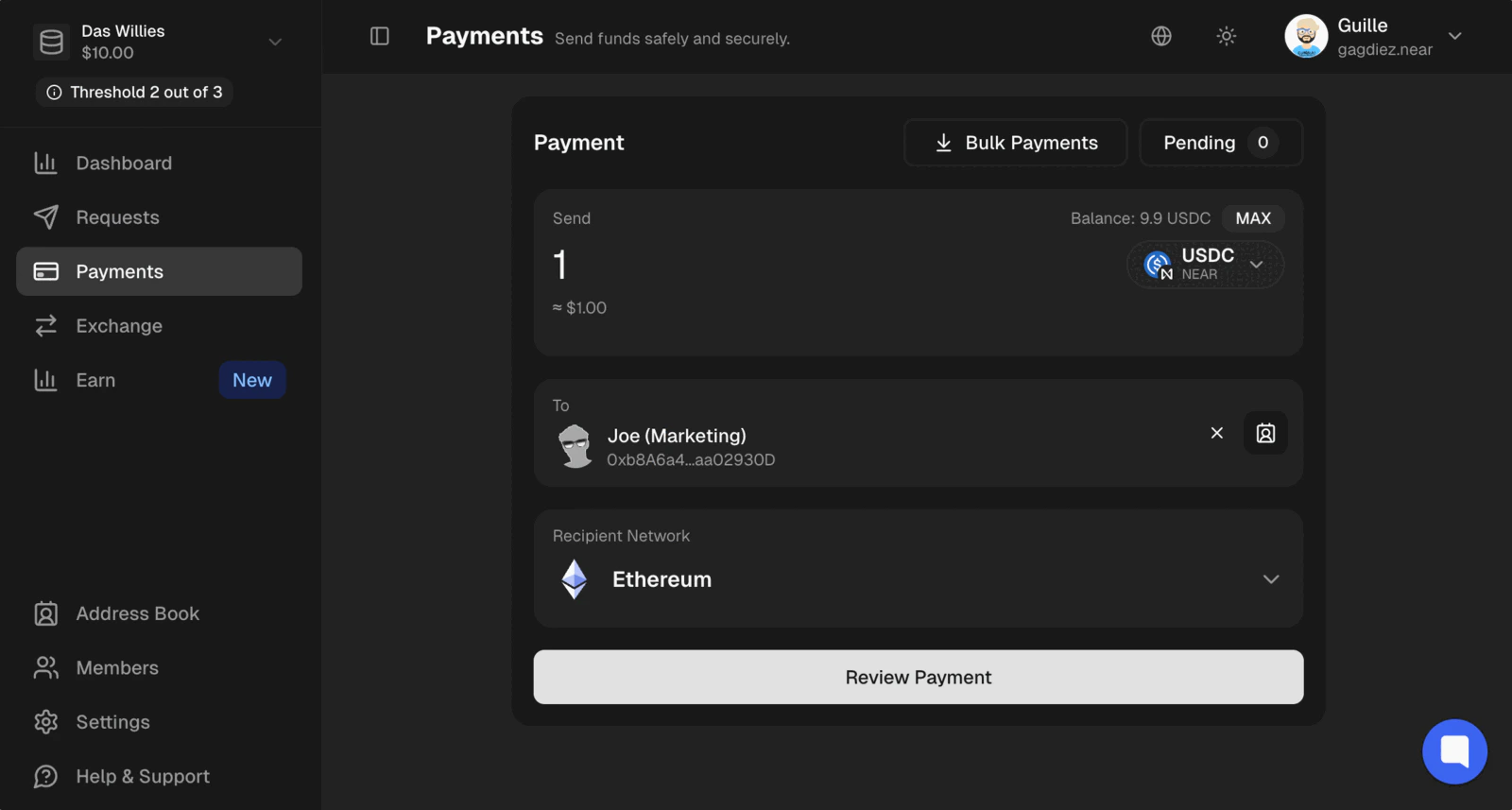 You can create a payment request even if the treasury does not have the necessary tokens. This allows you to request payments, and the team can top-up the treasury with the required tokens later on.
Use the [Address Book](#address-book) to save frequently used wallet addresses and easily select them when creating payment requests
### 🔒 Private Treasuries
[Confidential treasuries](/confidential-treasuries) can create payments to [near.com](https://near.com/) accounts, or directly to public wallet addresses.
Payments sent to [near.com](https://near.com/) accounts are private, as the recipient will need to [log in to near.com](/guides/confidential-payments) to access and withdraw the funds. In that case, the sender will appear as the confidential treasury's account on [near.com](https://near.com/).
Payments sent directly to public wallet addresses are also private, as they are executed within the private shard. However, in that case, the sender will be the near.com settlement account, as the funds are bridged from the private shard to the public one before being sent to the recipient.
***
## Reviewing the Payment Request
After filling in the payment details, you can review the payment request before submitting it. Feel free to add a comment to the payment to provide more context to the approvers.
You can create a payment request even if the treasury does not have the necessary tokens. This allows you to request payments, and the team can top-up the treasury with the required tokens later on.
Use the [Address Book](#address-book) to save frequently used wallet addresses and easily select them when creating payment requests
### 🔒 Private Treasuries
[Confidential treasuries](/confidential-treasuries) can create payments to [near.com](https://near.com/) accounts, or directly to public wallet addresses.
Payments sent to [near.com](https://near.com/) accounts are private, as the recipient will need to [log in to near.com](/guides/confidential-payments) to access and withdraw the funds. In that case, the sender will appear as the confidential treasury's account on [near.com](https://near.com/).
Payments sent directly to public wallet addresses are also private, as they are executed within the private shard. However, in that case, the sender will be the near.com settlement account, as the funds are bridged from the private shard to the public one before being sent to the recipient.
***
## Reviewing the Payment Request
After filling in the payment details, you can review the payment request before submitting it. Feel free to add a comment to the payment to provide more context to the approvers.
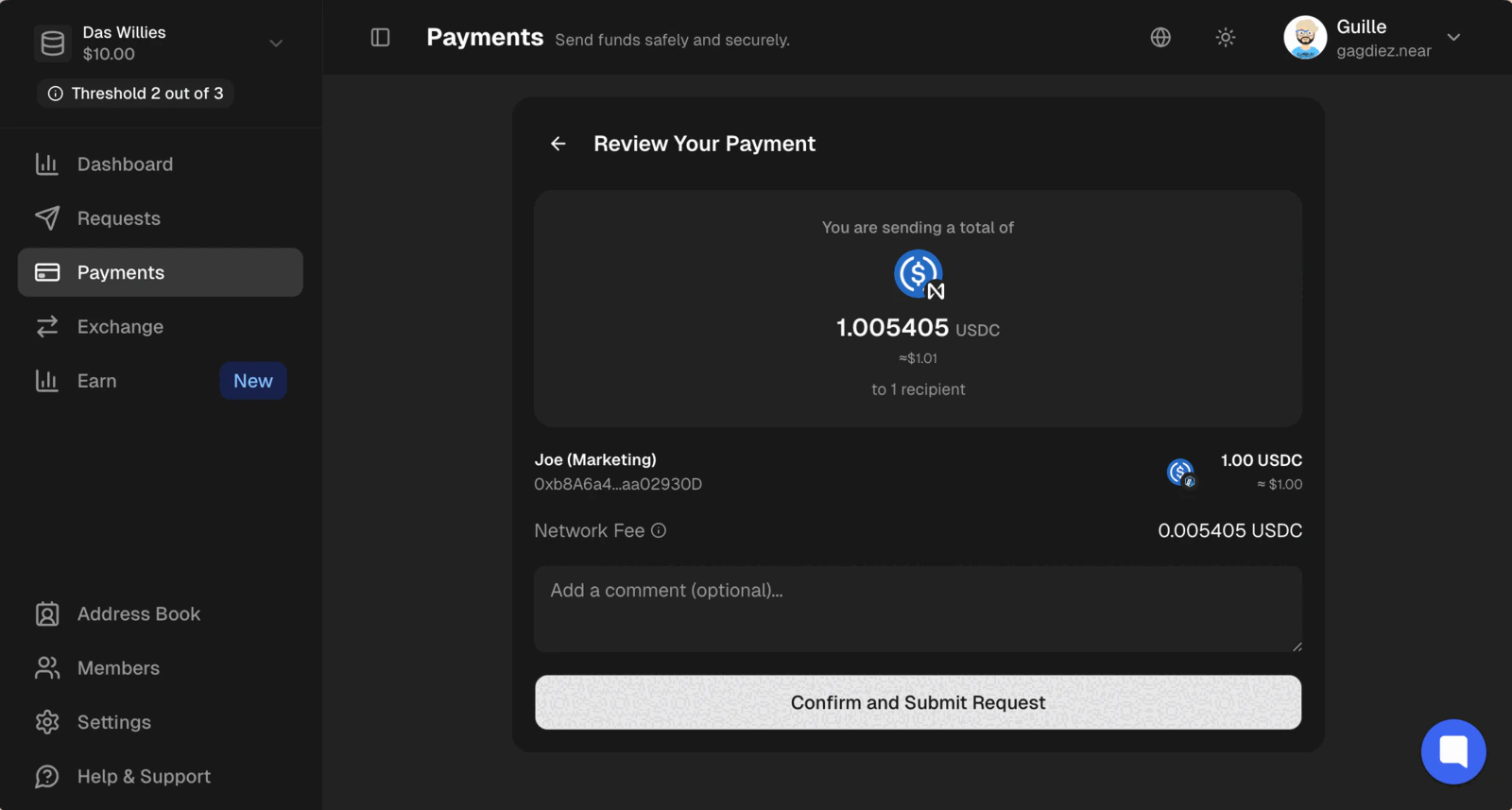 After the payment is approved and executed, you can generate a [receipt](/payments/handling-requests).
Make sure to select the right blockchain and enter the correct wallet address, as payments are irreversible.
***
## Address Book
Trezu allows you to save frequently used wallet addresses in an address book, making it easier to select the correct recipient when creating payment requests.
After the payment is approved and executed, you can generate a [receipt](/payments/handling-requests).
Make sure to select the right blockchain and enter the correct wallet address, as payments are irreversible.
***
## Address Book
Trezu allows you to save frequently used wallet addresses in an address book, making it easier to select the correct recipient when creating payment requests.
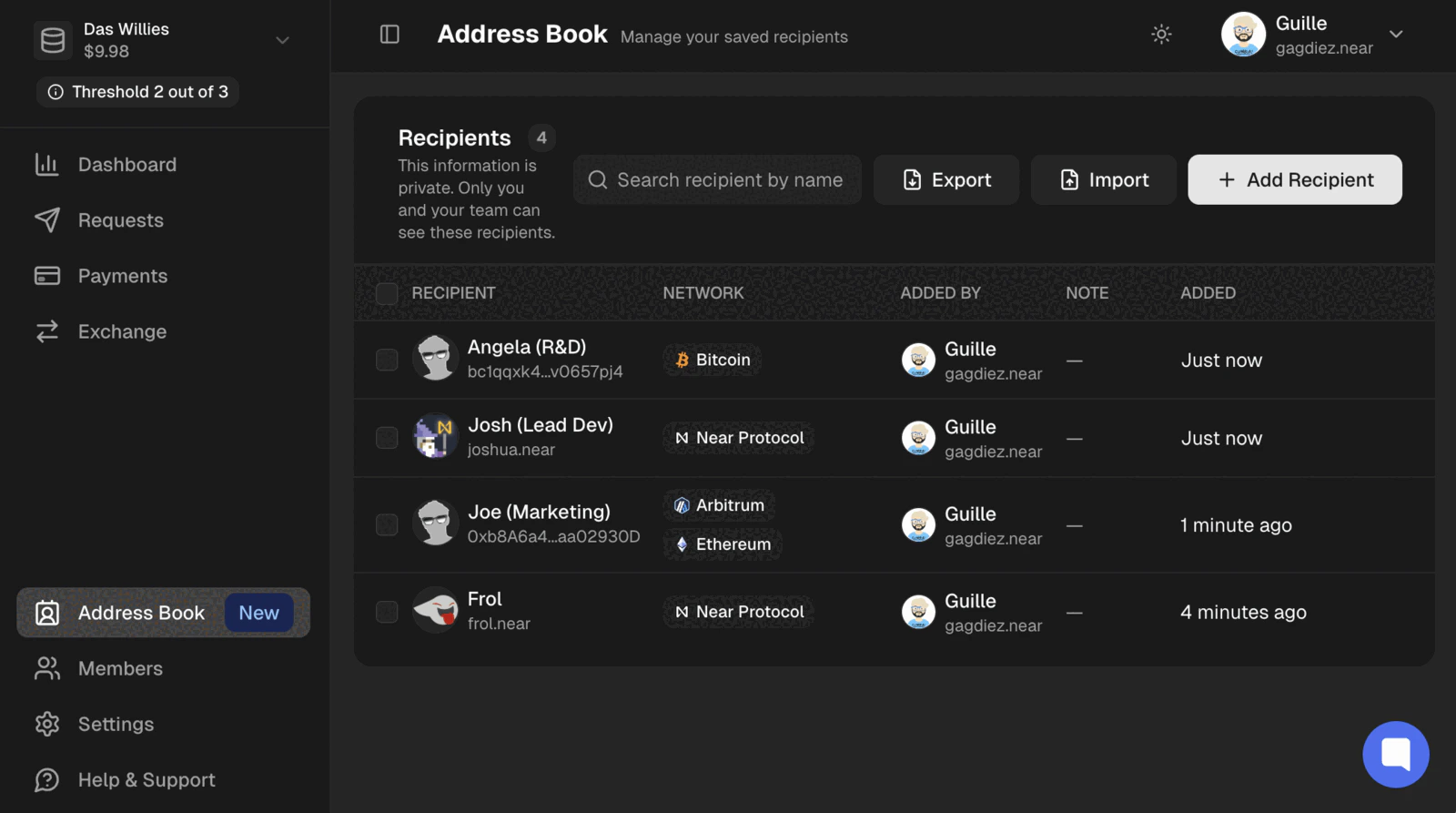 Addresses can be linked to multiple blockchains, so you can save a recipient's wallet address once and use it for payments across different networks
Simply navigate to the **`Address Book`** section in the left sidebar, then click on **`Add Recipient`** to save a new wallet address.
***
## Frequently Asked Questions
Here is a list of frequently asked questions about creating payment requests. If you have any other questions, feel free to reach out to your team or contact us!
No, once a payment request is submitted, it cannot be edited. If you need to make changes to a payment request, you will need to delete the existing request and create a new one with the correct details.
If the payment request is approved and executed with an incorrect wallet address, the funds will be sent to the wrong address and may be unrecoverable.
Always double-check the wallet address before submitting the payment request to avoid any mistakes.
***
## What's Next?
After submitting the payment request, it will be ready for the [Finance](/governance/members-and-roles#finance) team members to review and [vote on the request](/payments/handling-requests).
Head to [Handling Payment Requests](/payments/handling-requests) to learn how to review and vote on payment requests.
Addresses can be linked to multiple blockchains, so you can save a recipient's wallet address once and use it for payments across different networks
Simply navigate to the **`Address Book`** section in the left sidebar, then click on **`Add Recipient`** to save a new wallet address.
***
## Frequently Asked Questions
Here is a list of frequently asked questions about creating payment requests. If you have any other questions, feel free to reach out to your team or contact us!
No, once a payment request is submitted, it cannot be edited. If you need to make changes to a payment request, you will need to delete the existing request and create a new one with the correct details.
If the payment request is approved and executed with an incorrect wallet address, the funds will be sent to the wrong address and may be unrecoverable.
Always double-check the wallet address before submitting the payment request to avoid any mistakes.
***
## What's Next?
After submitting the payment request, it will be ready for the [Finance](/governance/members-and-roles#finance) team members to review and [vote on the request](/payments/handling-requests).
Head to [Handling Payment Requests](/payments/handling-requests) to learn how to review and vote on payment requests.