> ## Documentation Index
> Fetch the complete documentation index at: https://docs.trezu.org/llms.txt
> Use this file to discover all available pages before exploring further.
# Address Book
> Save recipients for faster, error-free payouts
The Address Book lets you save frequently used wallet addresses so you can pick the right recipient when creating a payment, instead of pasting an address every time.
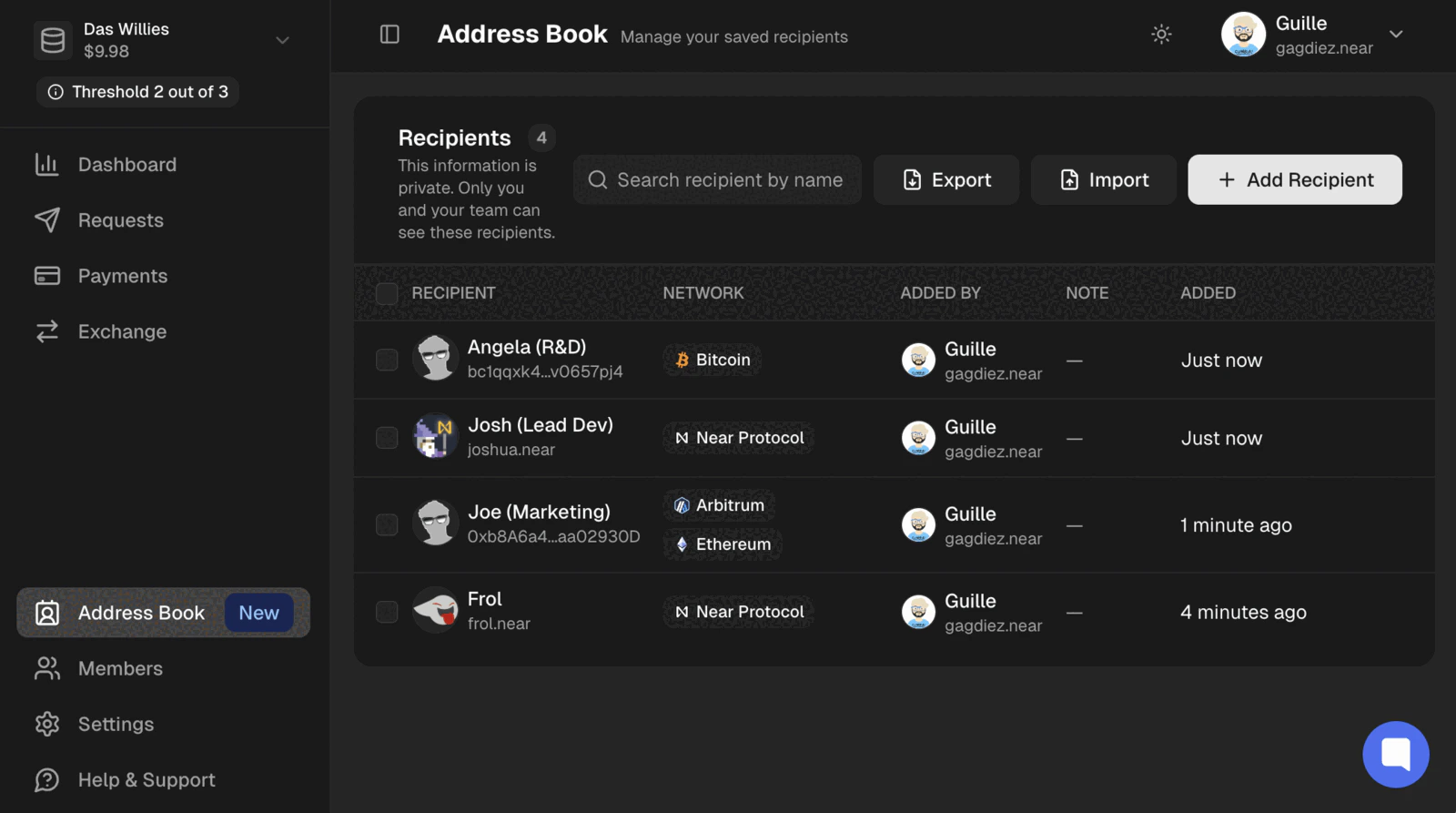 Saved recipients are **private and visible only to your team**. You can add them at any time — no payment or approval is required.
***
## Adding a Recipient
Navigate to the **`Address Book`** section in the left sidebar and click **`Add Recipient`**. Then fill in:
* **Recipient Name** — a label to identify the contact (e.g. *Alice*).
* **Recipient Address** — the wallet address.
* **Network** — one or more networks compatible with that address.
* **Note** *(optional)* — extra context, such as *contractor payment* or *vesting distribution*.
An address can be linked to multiple networks, so you can save a recipient once and use it for payments across different chains.
To save several contacts in one go, click **`Add Another Recipient`**, then **`Review Details`** to confirm and save them all.
Saved recipients can't be edited. To change a recipient's details, remove it and add it again.
***
## Importing Recipients
To add many recipients at once, click **`Import`**. You can either **upload a CSV file** or **paste** the data directly.
The data uses four columns:
```csv theme={null}
Recipient Name,Recipient Address,Network,Note (optional)
alice,alice.near,Near,Payroll
bob,0x82bAFB7aC512C62160C218bf184A3823AF60e9aD,Ethereum;BNB,Payroll
charlie,F4k6615fhQZerPEGyhhfyfkZR7p8Fd1RK2jdegRcg2Qo,Solana,
```
* **Network** can list several networks for the same address, separated by a semicolon (e.g. `Ethereum;BNB`).
* **Note** is optional and can be left blank.
Download the **template CSV** from the import screen to get the exact format, then fill in your recipients.
As you upload or paste, Trezu validates each row and shows a summary like *"Found 3 recipients on 4 networks"*. If a row has an error, it is flagged so you can fix it before continuing.
Click **`Continue to Review`** to confirm. Recipients that already exist in your address book are marked as **duplicates** and skipped, so only new ones are added.
***
## Exporting Recipients
Click **`Export`** to download your saved recipients as `address-book.csv`, in the same four-column format used for import.
If you select specific recipients first, only those are exported. Otherwise the whole address book is downloaded.
***
## Removing a Recipient
To remove a saved recipient, click the **delete** icon on its row and confirm. To remove several at once, select them using the checkboxes and click **`Remove`**.
Removing a recipient only deletes it from your address book — it has no effect on past payments.
***
## Using a Recipient
When creating a [single](/payments/single-payment) or [bulk payment](/payments/bulk-payment), select a saved recipient instead of typing the address — reducing the risk of sending funds to the wrong place.
Always double-check the address and network before submitting a payment. Payments are irreversible.
Saved recipients are **private and visible only to your team**. You can add them at any time — no payment or approval is required.
***
## Adding a Recipient
Navigate to the **`Address Book`** section in the left sidebar and click **`Add Recipient`**. Then fill in:
* **Recipient Name** — a label to identify the contact (e.g. *Alice*).
* **Recipient Address** — the wallet address.
* **Network** — one or more networks compatible with that address.
* **Note** *(optional)* — extra context, such as *contractor payment* or *vesting distribution*.
An address can be linked to multiple networks, so you can save a recipient once and use it for payments across different chains.
To save several contacts in one go, click **`Add Another Recipient`**, then **`Review Details`** to confirm and save them all.
Saved recipients can't be edited. To change a recipient's details, remove it and add it again.
***
## Importing Recipients
To add many recipients at once, click **`Import`**. You can either **upload a CSV file** or **paste** the data directly.
The data uses four columns:
```csv theme={null}
Recipient Name,Recipient Address,Network,Note (optional)
alice,alice.near,Near,Payroll
bob,0x82bAFB7aC512C62160C218bf184A3823AF60e9aD,Ethereum;BNB,Payroll
charlie,F4k6615fhQZerPEGyhhfyfkZR7p8Fd1RK2jdegRcg2Qo,Solana,
```
* **Network** can list several networks for the same address, separated by a semicolon (e.g. `Ethereum;BNB`).
* **Note** is optional and can be left blank.
Download the **template CSV** from the import screen to get the exact format, then fill in your recipients.
As you upload or paste, Trezu validates each row and shows a summary like *"Found 3 recipients on 4 networks"*. If a row has an error, it is flagged so you can fix it before continuing.
Click **`Continue to Review`** to confirm. Recipients that already exist in your address book are marked as **duplicates** and skipped, so only new ones are added.
***
## Exporting Recipients
Click **`Export`** to download your saved recipients as `address-book.csv`, in the same four-column format used for import.
If you select specific recipients first, only those are exported. Otherwise the whole address book is downloaded.
***
## Removing a Recipient
To remove a saved recipient, click the **delete** icon on its row and confirm. To remove several at once, select them using the checkboxes and click **`Remove`**.
Removing a recipient only deletes it from your address book — it has no effect on past payments.
***
## Using a Recipient
When creating a [single](/payments/single-payment) or [bulk payment](/payments/bulk-payment), select a saved recipient instead of typing the address — reducing the risk of sending funds to the wrong place.
Always double-check the address and network before submitting a payment. Payments are irreversible.